Showing posts with label Nokia. Show all posts

Reset Nokia Lock Code without any software


There have been several tutorials and questions on internet that shows how to reset the security locking code of your Nokia Symbian Phones. But honestly speaking, non of the tutorial works. Because, most of them keeps talking about Master Code security code which really does not work in every phone.

The technique behind Master code is that, every phone has unique International Mobile Equipment Identity (IMEI) number and with the help of this number, a specific software will calculate your so called master code. This might work in some phone but not always. Because how can you be so sure about that the Master Code generated is the correct one? If it has been the straight right security code then there won’t be any use of security code. Because, Lock codes and master codes are meant for security purpose in case if it’s stolen or lost some where.

Therefore this might not be much practical. The good thing you can do is, contact the authorized service center to have your code reseted. If you don’t want to do that then still you have a choice left. That is, you’ll have to hack the phone. Don’t worry with the term ‘hack’ we’ll do nothing like hacking.
We’ll use a backdoor to reset the security code. This might be illegal, but can be helpful if you badly need it.

Here is how you do it.

First of all download the security code hack patch from here.
Once you have downloaded it extract it with your favorite unzipper.  Now reate a new folder ‘Recogs‘ in your desktop.
za How to reset Nokia Lock Code without any software
New Recogs folder in desktop
Once it has been created, copy the THC-NOKIA-UNLOCK.MDLfile from the extracted file to Recogs folder.

zb How to reset Nokia Lock Code without any software
Drag or copy the file to Recogs folder

Now take out the memory card from your Nokia phone and plug it in to you card reader and open it from my computer.

zc How to reset Nokia Lock Code without any software
Open your card from my computer

Once you open go to System folder. If it is not there then don’t worry it is hidden folder. To go to System folder, type ‘system‘ next to your card location as shown in the image below (in this tutorial the drive letter for the memory card is H:).

zd How to reset Nokia Lock Code without any software
Type-in system to go to system folder

Instantly you’ll be inside system folder.

ze How to reset Nokia Lock Code without any software
The System folder
Once you are inside the system folder copy the Recogs folder from desktop to the system.

zf How to reset Nokia Lock Code without any software
Recogs folder being copied to system folder

Finally when it’s copied, eject your memory card and insert it to your phone which you want to unlock. Once you insert the memory card, it will automatically start the unclocker file and resets the Locking code.

Once it succesfully resets your Locking code, it will prompt a message on white screen with, ‘Press a Key’.
Press any key and your code is rested to 12345. Now you can change it any time.

Thats it, you are done. No need of any electronic device, no need of any data cards no need of any complicated and insecure software and the phone is yours again.

If you enjoyed this tutorial then subscribe to us for free and also bookmark us.

Keylogger For Symbian S60v3 Devices

A Keylogger is program or file that has been executed to record all of the keystrokes a computer. This can be utilized for monitoring all the activities that takes place on a computer and the details will be stored in the software.

Keylogger for S60v3 is used to monitor the keystrokes that occurs on your Symbian device when the application is running. The software is written is python language and it require its runtime environment for proper working.

The software will open in background when opened and will monitor the keystrokes.


The log can be obtained from an automatically generated text file located on E:\log.txt where all the keystrokes with the application name will be listed in the same order as pressed.


Download phython from here and S60v3 Keylogger from here.

NOTE: This Post is purely for educational purpose only.


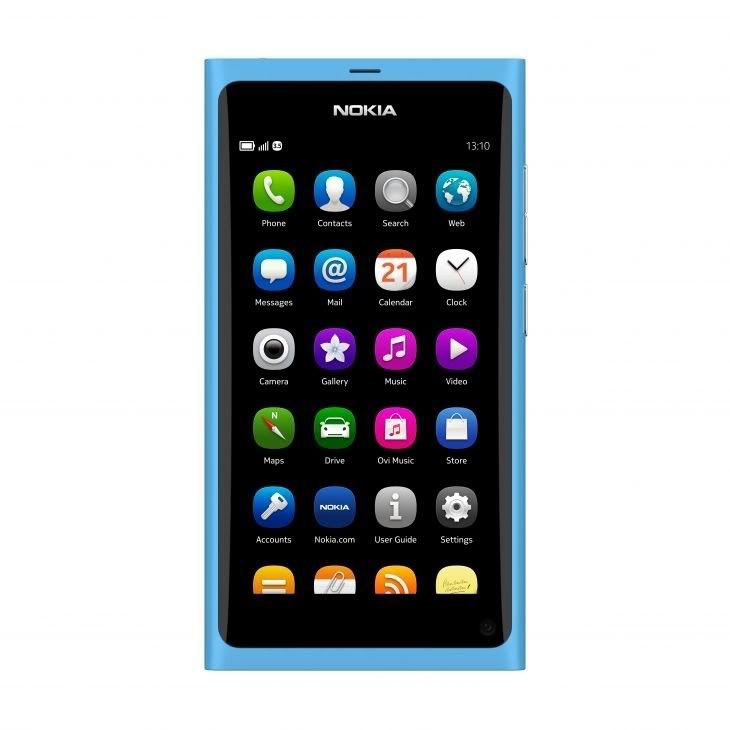
Nokia N9 – Tech Specs and Release Details

Nokia N9 is among the latest gadget in streets currently and the tech specs seems to be cool as it’s Nokia’s first Intel MeeGo based smartphone. It seems that for its latest gem, Nokia really cared about the phone hardware unlike what it used to do with its previous high end phones.

The all new N9 announced last week got really good, in fact best hardware specs as compared to other Nokia high end phones available. But still not upto the mark as it doesn’t even reach near to what current generation phones of other companies are offering. Here is a short discussion what Nokia is offering with its N9.


Nokia N 9 Hardware

Nokia brought 1GHz CPU this time with Cortex A8 CPU, along side it comes with 1GB of RAM. That’s pretty old combo and was blooming last year and this year getting this combo is no brainier. There’s no dual-core antics and the single core is pretty weak, but is good if you look at the OS running on it.

The screen size has been increased a bit i.e 0.4inches and the new player comes with 3.9inch screen with same AMOLED display panel as that of Nokia N8. The display resolution is rapidly increased to 480 x 854 pixels.

Its obviously big in dimensions than N8 and has dimensions of 116.5 in height, 61.2 in width and 12.1 in depth. Wireless connectivity includes 3G support up to 14Mbps, WiFi and Bluetooth 2.1 with A2DP and EDR.
Unlike the N8, its not totally camera featured. This time the camera is reduced to 8 Megapixels which supports resolution of 3264×2448 pixels carried with auto focus as well as LED Flash. Yes, there’s also a secondary camera. Video recording still supports only 720p clippings at 30fps.

Phone is available in two storage option (internal storage) 16GB and 64GB there is no 32GB option and neither facility for installing additional microSD card for extra storage. That means, its iPhone here the internal memory is the final one.

Software

The phone comes with MeeGo OS v1.2  (Harmattan) looks similar to Symbian Anna but still no idea regarding that, time will clear everything.

Multimedia capabilities

The MeeGo OS loaded on N9 supports MP3/WAV/eAAC+/WMA/FLAC for audio playback and MP4/H.264/H.263/WMV player for video playback. Along with that it comes with pre-loaded games like Angry Birds Magic (NFC), Galaxy on Fire 2, Real Golf 2011.

Battery Life

It comes with 1450mAh battery but as we didn’t get the hands-on battery performance we will clear the reports later but as stated by Nokia it provides Up to 380 (2G) and Up to 450h (3G) when on standby and Up to 11h (2G) and Up to 7h (3G) for talktime.

Conclusion

Nokia N9 looks similar to iPod Nano 6G, yes that’s small actually. Buying the phone right now won’t make any extra ordinary decision. The phone has old hardware which I used to review last year, even the camera is low and supports only 720p recordings. The storage options are really bad, 32GB was must option to be added. Plus its not going to hit India soon and only supports micro SIM card.

The JAMES BOND Trick


If you short-circuit theleft middle and right pins on the bottom of the phone with all touching each other, the connections nokia software hangs! The profile "Headset" will be activated.

Before you do this just activate the "Automatic Answer" in the headset profile and set the ringing volume to "Mute".

Now you can use your phone for checking out what people are talking about in a room. Just place it under a table in a room and call it.

The phone receives the call without ringing and you can listen to what people are saying.

Nokia Secret Codes

NOKIA PHONE CODES :
  • Nokia Codes : *3370#
This Nokia code activates Enhanced Full Rate Codec (EFR) - Your Nokia cell phone uses the best sound quality but talk time is reduced my approx. 5%
  • Nokia Codes : #3370#
Deactivate Enhanced Full Rate Codec (EFR)
  • Nokia Codes : *#4720#
Activate Half Rate Codec - Your phone uses a lower quality sound but you should gain approx 30% more Talk Time
  • Nokia Codes : *#4720#
With this Nokia code you can deactivate the Half Rate Codec
  • Nokia Codes : *#0000#
Displays your phones software version, 1st Line : Software Version, 2nd Line : Software Release Date, 3rd Line : Compression Type
  • Nokia Codes : *#9999#
Phones software version if *#0000# does not work
  • Nokia Codes : *#06#
For checking the International Mobile Equipment Identity (IMEI Number)
  • Nokia Codes : #pw+1234567890+1#
Provider Lock Status. (use the "*" button to obtain the "p,w" and "+" symbols)
  • Nokia Codes : #pw+1234567890+2#
Network Lock Status. (use the "*" button to obtain the "p,w" and "+" symbols)
  • Nokia Codes : #pw+1234567890+3#
Country Lock Status. (use the "*" button to obtain the "p,w" and "+" symbols)
  • Nokia Codes : #pw+1234567890+4#
SIM Card Lock Status. (use the "*" button to obtain the "p,w" and "+" symbols)
  • Nokia Codes : *#147#
This lets you know who called you last (Only vodofone)
  • Nokia Codes : *#1471#
Last call (Only vodofone)
  • Nokia Codes : *#21#
This phone code allows you to check the number that "All Calls" are diverted to
  • Nokia Codes : *#2640#
Displays phone security code in use
  • Nokia Codes : *#30#
Lets you see the private number
  • Nokia Codes : *#43#
Allows you to check the "Call Waiting" status of your cell phone.
  • Nokia Codes : *#61#
Allows you to check the number that "On No Reply" calls are diverted to
  • Nokia Codes : *#62#
Allows you to check the number that "Divert If Unreachable (no service)" calls are diverted to
  • Nokia Codes : *#67#
Allows you to check the number that "On Busy Calls" are diverted to
  • Nokia Codes : *#67705646#
Phone code that removes operator logo on 3310 & 3330
  • Nokia Codes : *#73#
Reset phone timers and game scores
  • Nokia Codes : *#746025625#
Displays the SIM Clock status, if your phone supports this power saving feature "SIM Clock Stop Allowed", it means you will get the best standby time possible
  • Nokia Codes : *#7760#
Manufactures code
  • Nokia Codes : *#7780#
Restore factory settings
  • Nokia Codes : *#8110#
Software version for the nokia 8110
  • Nokia Codes : *#92702689#
Displays - 1.Serial Number, 2.Date Made, 3.Purchase Date, 4.Date of last repair (0000 for no repairs), 5.Transfer User Data. To exit this mode you need to switch your phone off then on again
  • Nokia Codes : *#94870345123456789#
Deactivate the PWM-Mem
  • Nokia Codes : **21*number#
Turn on "All Calls" diverting to the phone number entered
  • Nokia Codes : **61*number#
Turn on "No Reply" diverting to the phone number entered
  • Nokia Codes : **67*number#
Turn on "On Busy" diverting to the phone number entered

NOTE : 12345 This is the default security code, press and hold # Lets you switch between lines